Topshop – User Experience Review 2015
16 February 2015 - Gayle Whittaker
The Top Shop homepage is all about the festive season from what to wear to the Christmas party to what to buy as gifts.
.jpg)
The free delivery offer on orders over £50 is clearly shown in the top banner and an animated lorry cleverly draws attention to a link where user can find the final order dates for Christmas.

This proves that the retailer can be trusted to get your purchase to you in time for Christmas.
In addition to the Christmas feature the homepage contains carousels for the latest season’s trends. These are nicely and simply presented on topics such as what’s new, what’s on offer, and the best knitted jumpers.
The user controls these carousels to browse at their discretion without the distractions of lots animating at the same time.
Navigation
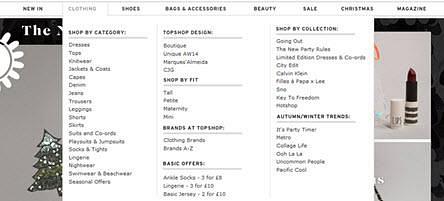
The primary navigation is a part-width mega menu which works well categorising and ordering the products effectively into sections then logical sub-sections. The sub-sections headings are clearly defined in bold and capitalised that makes it easy for shoppers to find what they’re looking for.
The navigation is within a persistent header that does not move or hide when the user scrolls. This allows the user to quickly navigate to other sections , view what’s in their bag and what the cost is.
Unfortunately the navigation does not highlight where you are which would help to convey a sense of place in the site.
Product listings page
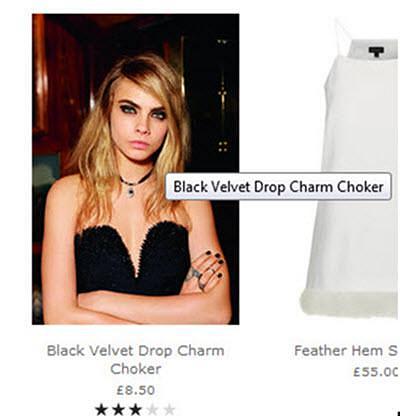
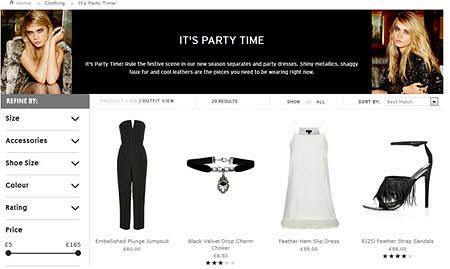
The product listings page makes good use of whitespace to display each product with a short descriptive title, cost and star rating.
The images are large and the roll-over product display on a live model is a nice feature but in some cases this view gives more emphasis on the model than the actual item which can be lost in the image.
A faceted navigation is implemented in an accordion menu that provides multiple filters for product search. This is a simple feature that does not overwhelm the user.
Product page
The product pages allow users to zoom into images. There are a good number of persuasion techniques at play such as customer’s reviews, number of Facebook likes, and an indicator showing how much stock is left.
A prominent clear all to action of ‘add to bag’ helps.
After adding products to the bag, the user can see a clear tick icon and message that their item has been added but they remain on the product page. This gives them the option to carry on shopping or to go to checkout. The My Bag feature in the header highlights the number of items in ‘my bag’ and the total cost – a clear visual indicator and feature that users are familiar with and generally expect.
Basket
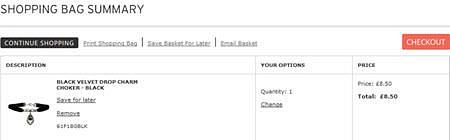
The shopping bag summary is a good example of a clear and simple basket design. Nothing fussy, nothing distracting, it drives the customer straight to checkout securely whilst providing information on payment options, delivery options and states whether you qualify for free delivery with minimal fuss.
There are nice features to print, save and email your shopping bag allowing users to maintain their list to complete at another time or share it with friends.
Checkout
The only requirements to register as a new customer is an email and password which means speed and efficiency is the focus, rather than data capture. The checkout is an efficient four step process – sign in, delivery, payment and confirmation. Each page is displayed intuitively visually grouping elements together and using active language to proceed at each step in clear call to actions.
Accessibility has been implemented in some areas such as skip to navigation links but further areas such as providing a visible focus indicator for users using the keyboard to navigate and allowing the mega menu to operate when not using the mouse would be a great benefit.
Conclusion
The Top Shop website is an effective e-commerce site that is compelling and functional. The site communicates a strong brand image that expresses the personality of their target users, which guides them effortlessly through the site from browsing to purchasing.
You might also be interested in...
Synthetic Users and Digital Clones: A UX Researcher’s Honest Take
2 April 2026AI research tools promise speed – but at what cost to human insight? Are synthetic users and digital clones really the same, and do they truly work for UX research? We cut through the hype to share a clear, practical view: where synthetic methods add genuine value, where human insight remains essential, and how to tell the difference between synthetic users and digital clones in real‑world research. A must‑read for UX professionals, product teams, and researchers navigating AI‑driven testing.
Read the article: Synthetic Users and Digital Clones: A UX Researcher’s Honest TakeUser Vision Joins the New DOS 7 Framework - Making Public Sector UX Procurement Simpler
1 April 2026User Vision has secured a place on the Government Commercial Agency (previously CCS) new Digital Outcomes and Specialists 7 (DOS 7) framework - making it faster and simpler than ever for public sector organisations to access specialist user research, accessibility, and user-centred design services.
Read the article: User Vision Joins the New DOS 7 Framework - Making Public Sector UX Procurement SimplerWhy Your Usability Tests Are Failing: The Hidden Pitfalls That Mislead Teams
25 February 2026Many teams run usability tests that quietly mislead them—this article exposes the hidden pitfalls in planning, moderation and analysis, and explains how to fix them.
Read the article: Why Your Usability Tests Are Failing: The Hidden Pitfalls That Mislead Teams